
01PERSONAL PROJECT
Personal AI Writing Tool
Bring manuscripts, four-level outlines, characters, story maps, graphs, long-term memory and custom AI workflows into one local writing workspace, with the author approving changes.
THE COMPLETE TOOLKIT / v0.2.2
A whole world beyond the draft.
From your first reference file to a complete novel. Explore the tools already available in NovelFlow.
Your writing desk
Begin with an existing manuscript or a new idea.
Projects, volumes & chapters
Keep your manuscript and reference material organized.
- Create a project with a title, genre, synopsis and writing goal.
- Create, rename and reorder volumes and chapters; switch chapters from the sidebar.
- Separate manuscript volumes from reference volumes for outlines, worldbuilding and style notes.
- Track chapter, volume and manuscript word counts without counting reference material.
- Start with an empty project, or build your world and outline before chapter one.
- Use manual or AI-assisted guided setup, saving accepted settings as sourced reference entries.
Editing & reference reading
Keep everyday writing tools within reach.
- Write in a plain-text editor with visible editing, saving and saved states.
- Combine automatic saving with manual saves after important revisions.
- Find matches and replace one occurrence or all occurrences to standardize names and terms.
- Select a passage as the scope for AI diagnosis, expansion or polishing.
- Switch reference chapters between Markdown editing and formatted previews of headings, lists, quotes and tables.
Smart import & source organization
Bring manuscripts, setting collections and reference folders into a project.
- Import TXT, Markdown, DOCX, text-based PDF and structured NovelFlow JSON.
- Import individual files or scan folders, recognizing chapter headings and splitting manuscript content.
- Preview manuscript, outline, setting, reference and ignored items with classification explanations and items needing review.
- Correct classifications individually or in batches before committing the import.
- Review additions, replacements and retained content on re-import, preserving manual edits.
- Parse, deduplicate and index large collections in batches with file-level progress.
Four-level outlines
Plan the whole book and the details of each chapter.
- Organize plans at book, volume, story-arc and chapter levels.
- Edit and save author outlines and AI references separately, without automatic replacement.
- Extract chapter outlines from existing text to organize an older manuscript.
- Generate chapter references from higher-level outlines, then edit and adopt them.
- Index outlines with sources and versions for writing tasks, and restore deleted nodes from the recycle bin.
Your story world
Keep characters, rules and events connected to evidence.
Settings & world rules
Maintain a structured reference for your fictional world.
- Maintain locations, factions, world rules, objects and events by category.
- Create, edit, search, import and export settings; inspect category counts and recent changes.
- Record location hierarchies and access conditions, plus faction positions, members and changes.
- Describe conditions, costs, limits and exceptions for rules, and ownership and state for objects.
- Connect events to time, location, participants and outcomes; distinguish plans from established events.
- Inspect sources, pending candidates and conflicts while retaining author-approved settings.
Character profiles & knowledge
Track who a character is and what they know at this point.
- Maintain identity, aliases, appearance, portraits and background.
- Record goals, motivations, personality, habits and speaking style.
- Track abilities, constraints, costs, first appearances and current state.
- Distinguish character knowledge, author knowledge, reader knowledge and unrevealed information.
- Keep relationship direction, type, stage, linked chapters and textual evidence.
Foreshadowing & story maps
Follow unresolved threads and the geography of your story.
- Track foreshadowing from planned and planted through development, pending payoff, resolved or abandoned.
- Link setup chapters, evidence, planned payoff ranges and the passages that resolve them.
- Maintain map backgrounds, regions, location coordinates and submaps.
- Record routes, directions and distances, linking geography to chapters or time.
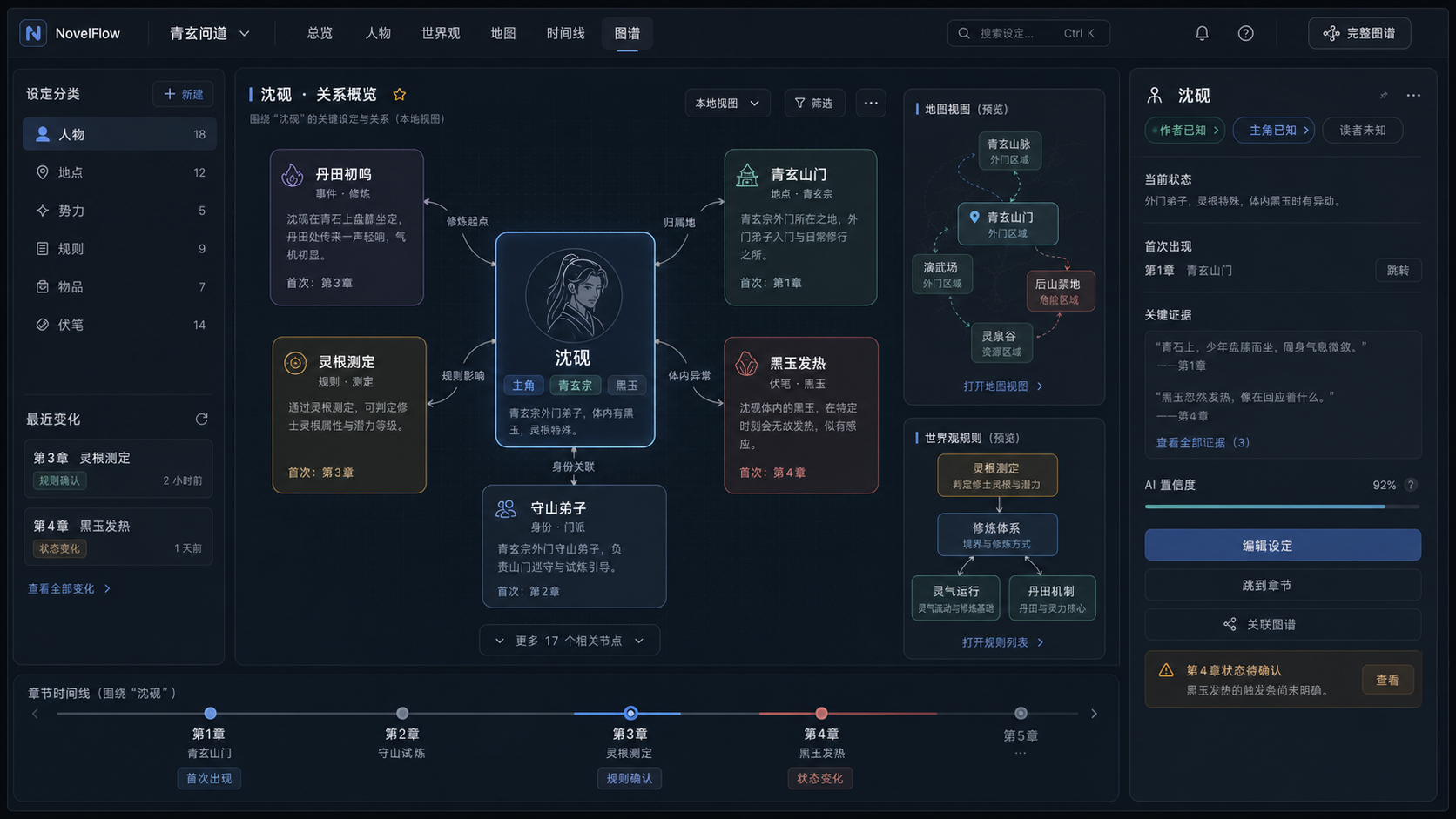
Knowledge graphs & evidence
Turn relationships scattered across your text into an inspectable network.
- Build entity networks for characters, places, organizations, objects, rules and events.
- Extract from manuscript, references, outlines or combined sources, scoped to a chapter or range.
- Extract in batches with progress, preserving source evidence on nodes and relationships.
- Review conflicts, merge aliases and duplicate nodes, and correct entity types.
- Edit relationships in 2D, inspect structure in 3D, and save and reload graph versions.
Working with AI
From discussion to revision, inspect the evidence and the result.
Discussion, expansion & drafting
Choose the assistance that fits the task at hand.
- Discuss characters, settings, plot and the content of the current page.
- Diagnose progression, conflict, information leaks and character voice.
- Explore next-step directions with conflicts, costs and connections to foreshadowing.
- Expand or polish selected text with explicit length, facts and preservation requirements.
- Draft candidate chapters from outlines, viewpoint, target length and plot requirements.
- Bind separate default workflows for chat, diagnosis, direction, expansion, polishing and chapter generation.
Memory, retrieval & context ledger
Keep long-form material locally and select relevant context for each task.
- Search manuscript text, outlines, settings, graphs, memories and reference sources.
- Combine text matching, semantic retrieval, graph relationships and task rules.
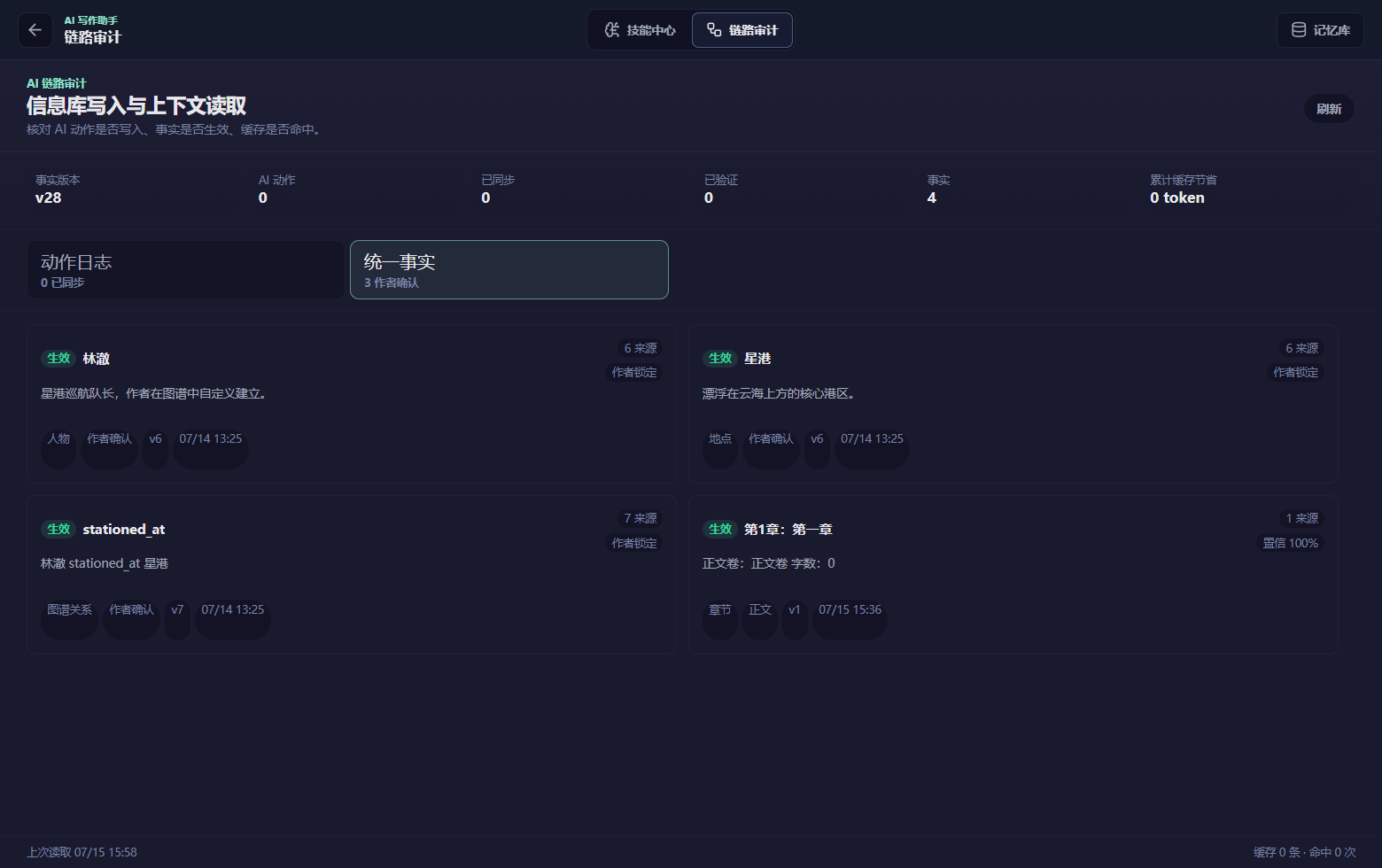
- Review new facts as memory candidates before approval, with sources and conflict notices.
- Categorize, search, pin, archive and restore memories, with versions and usage records.
- Inspect context usage, source slots and the material actually sent in a request.
- Select priority references, inspect omitted or trimmed material, and distinguish plans from established facts.
- Use a chapter notebook to gather the current outline, canon, graph, memory and manuscript evidence, with follow-up retrieval for missing facts.
Layered review & focused revisions
Inspect the issue and evidence before deciding what to change.
- Generate chapters through planning cards, candidate drafting, rhythm adjustments and review stages.
- Review language patterns, narrative naturalness, continuity and facts, followed by an independent final review.
- Retrieve earlier text, settings, outlines and memories for specific continuity claims.
- Generate focused patches, inspect before-and-after differences, and accept or reject them.
- Retry from saved stages when checkpoints are valid, retaining failure states and evidence.
Reviewable Agent actions
Turn explicit editing requests into reviewable changes in your project.
- Candidate cards show the target, differences, scope, sources and review status.
- Confirm manuscript writes, appends, selection replacements, chapter creation and title changes.
- Approve changes to author outlines, AI references, settings, character profiles and foreshadowing.
- Approve workflow and Skill updates, task bindings and non-sensitive interface preferences.
- Accept, skip, rewrite or give feedback; inspect tool receipts and undo controls.
- Reload saved conversations and progress after interruption to recover completed actions.
- After confirmation, follow the formal write, persisted readback and knowledge sync, recovering sync under the original task when needed.
Make it yours
Keep your writing method reusable and your manuscript recoverable.
Skill library & customization
Turn genre techniques and personal style into reusable rules.
- Search by name, category and enabled state, and read each Skill in full.
- Enable or disable built-in Skills, create and edit custom Skills, and restore built-in configurations.
- Configure applicable Agents, stages, priority, input conditions and output requirements.
- Load matching Skills by task, Agent and stage, with receipts showing what was used.
- Coordinate general rules, project Skills and current requests while respecting author instructions and approved settings.
Visual workflow studio
Compose writing processes and compare their actual results.
- Drag and duplicate nodes, connect compatible ports, edit properties and validate workflows.
- Start from complete examples, functional groups or foundational modules, using them whole or composing them per task.
- Combine input, context, retrieval, Skill, Agent, model, review, scoring and conditional routing nodes.
- Add patch, author approval, write and output steps; save or autosave the canvas.
- Configure supported node failure strategies such as bounded retries, fallback models and checkpoint recovery.
- Highlight active nodes and inspect workflow versions, time, tokens, remaining steps and tool receipts.
- Share one task record across chat, run cards and the canvas, passing saved artifacts between nodes while retaining recovery state.
- Compare candidate text, individual scores, evidence, time and tokens across workflow runs.
Models & writing preferences
Choose your models and tune the editing environment.
- Manage providers, API endpoints, model names and locally stored credentials.
- Use model checks to validate configuration, then test the connection with a short message.
- Switch models from the selector and choose configurations by task and workflow.
- Adjust theme, editor font size, indentation, autosave delay and automatic mirroring preferences.
- Collapse both writing sidebars and adjust prose width for a focused workspace.
- External models are used through your configuration; Agents cannot directly access or change keys, endpoints or manuscript directories.
Versions, export & recovery
Keep a history of important changes and a path to another device.
- Commit described versions and inspect added, removed and changed content.
- Restore historical states and recover chapters, outline nodes and supported graph items from recycle bins.
- Export manuscript ranges in a selected format, preserving chapter order, titles and paragraphs.
- Create and restore project backups, checking volumes, chapters, outlines, settings, graphs and memories.
- Move to a compatible app version on another device, reconfigure credentials and verify data and task recovery.
- Installed builds can check signed updates and verify the version, project data and recent task after installation and restart.
01CURRENT CAPABILITY
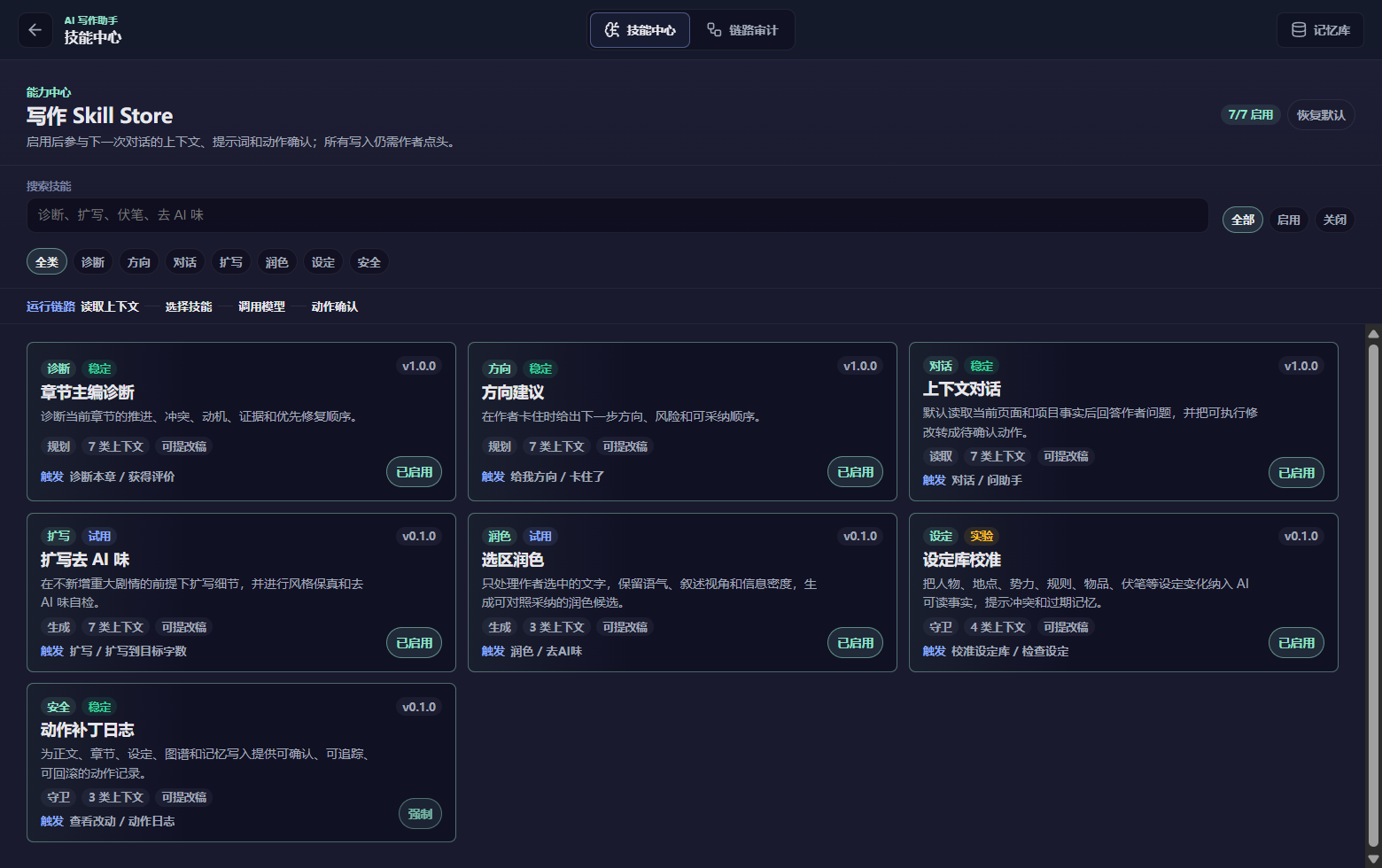
Skill Store
Skills are managed inside the local desktop app.
- Filter by name, category, and enabled state
- Enable, disable, or select skills for the next task
- Create and edit custom skills or restore built-in skills
- A skill cannot bypass author confirmation and write directly to the manuscript
02CURRENT CAPABILITY
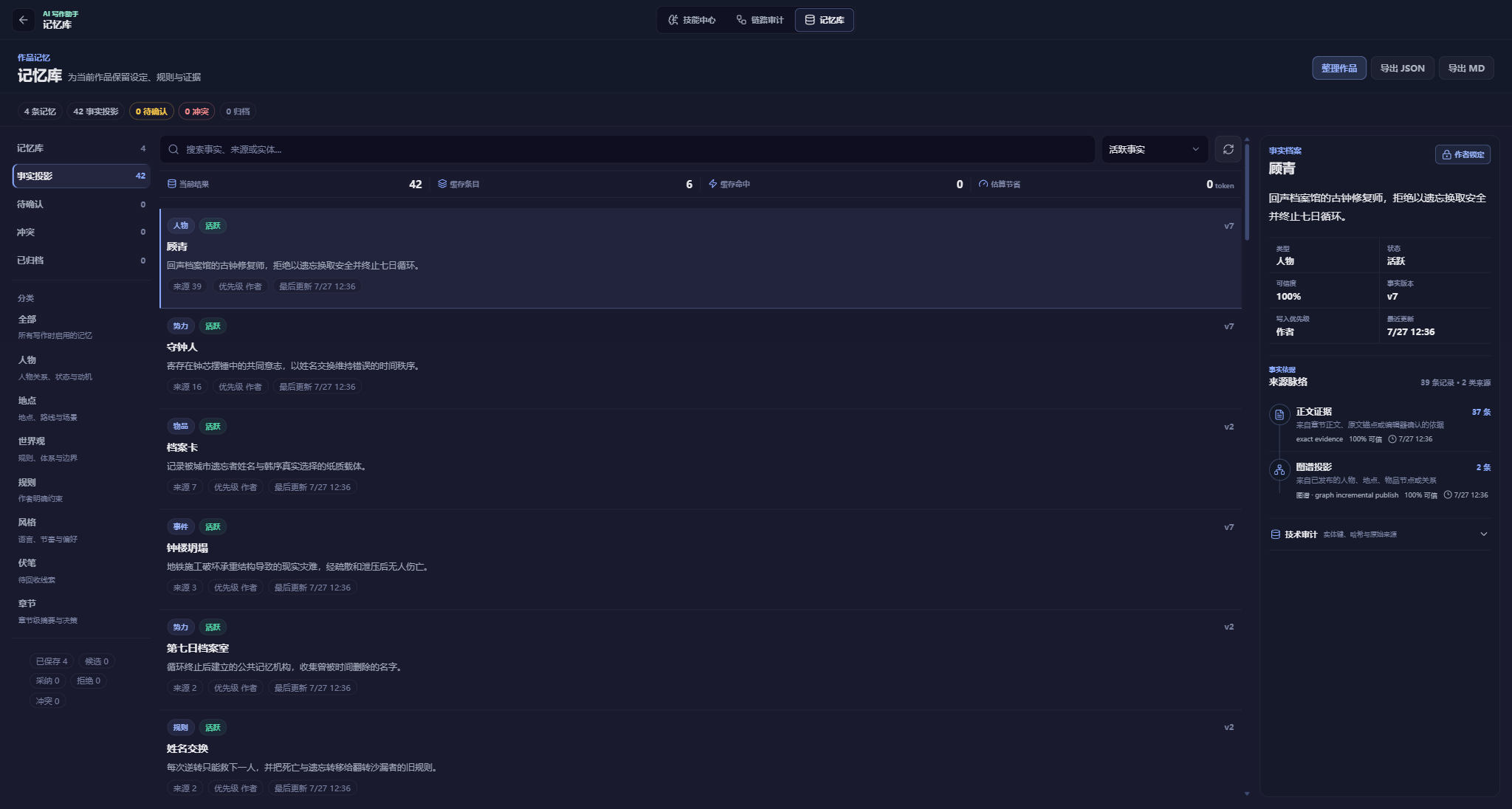
Memory system
The author decides what becomes long-term memory.
- Create memory candidates from imported text and the story graph
- Activate a candidate only after author confirmation
- Categorize, search, pin, archive, restore, and delete
- Retain source, version, and usage records and flag conflicts for review
03CURRENT CAPABILITY
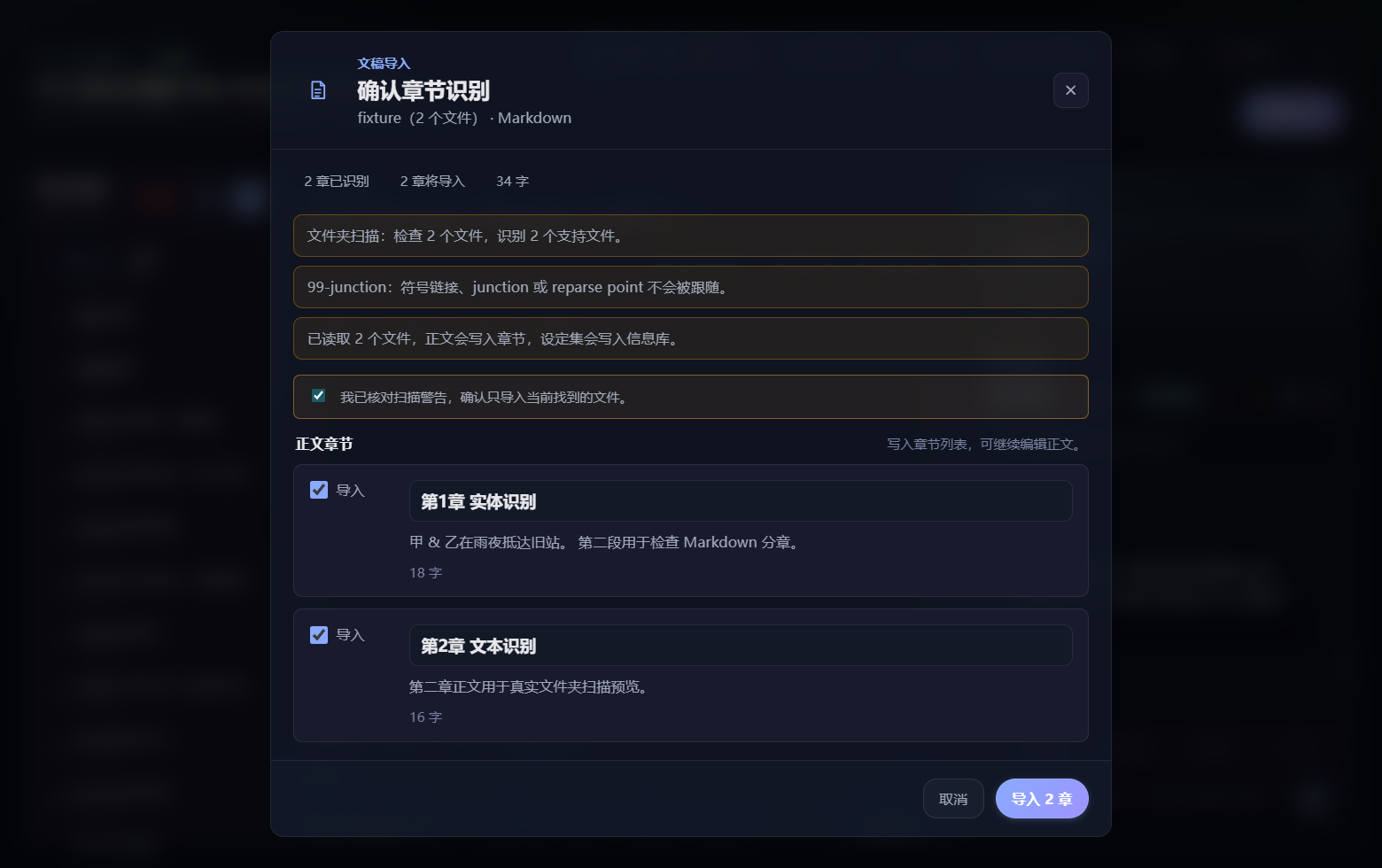
Local file import and automatic classification
Automatic recognition provides a reviewable and editable classification suggestion.
- Choose one file or scan a local folder
- Read TXT, Markdown, DOCX, PDF, and structured JSON
- Recognize chapter headings and split manuscript text
- Show classification reasons and confidence
- Correct story-material items to manuscript text before submission
- Complex PDF layouts may require manual review
04CURRENT CAPABILITY
AI writing and layered review
Generated text remains a candidate until the author accepts it.
- Gather chapters, story material, character state, foreshadowing, graph data, memory, and author-selected references
- Filter, deduplicate, order, isolate, budget, and record context sources
- Select skills and model settings for the task
- Review language patterns, narrative authenticity, and factual continuity
- Revise evidence-backed issues and return the candidate for author confirmation
SYSTEM MAP / 07 STAGES
Personal AI Writing Assistant · Agent Architecture
From the turn snapshot and context compilation to author confirmation, local commit, and evidence-backed recovery.
01 Writing task and turn snapshot
- Author task
- Single execution plan
- Frozen turn input
02 Session coordination and context compilation
- Current chapter and outlines
- Setting and knowledge relations
- Character state
- Long-term memory
- Skills and tools
- Author material
- Align, deduplicate, order, isolate, budget, and record sources
03 Local import and automatic classification
- File or folder
- TXT / Markdown / DOCX / PDF / JSON
- Suggested class, reason, and confidence
- Author edits and confirmation
04 Skill store, model settings, and candidate generation
- Filter and enable local skills
- Edit custom skills
- User-configured model provider
- Candidate manuscript
05 Layered review and bounded revision
- Language-pattern review
- Narrative-naturalness review
- Factual-continuity review
- Revise evidence-backed issues only
06 Memory, author confirmation, and local commit
- Memory candidate and provenance
- Conflict review
- Author confirmation
- Local manuscript commit
- Long-term memory activation
07 Evidence and recovery loop
- Context record
- Model-call record
- Commit record
- Failure recovery
- Next task